Environment Variables
Environment variables let you store configuration such as API keys, tokens, and base URLs outside of your code. They suit anything you'd rather not paste into a tab, particularly secrets you don't want saved to a file or caught in a screenshot.
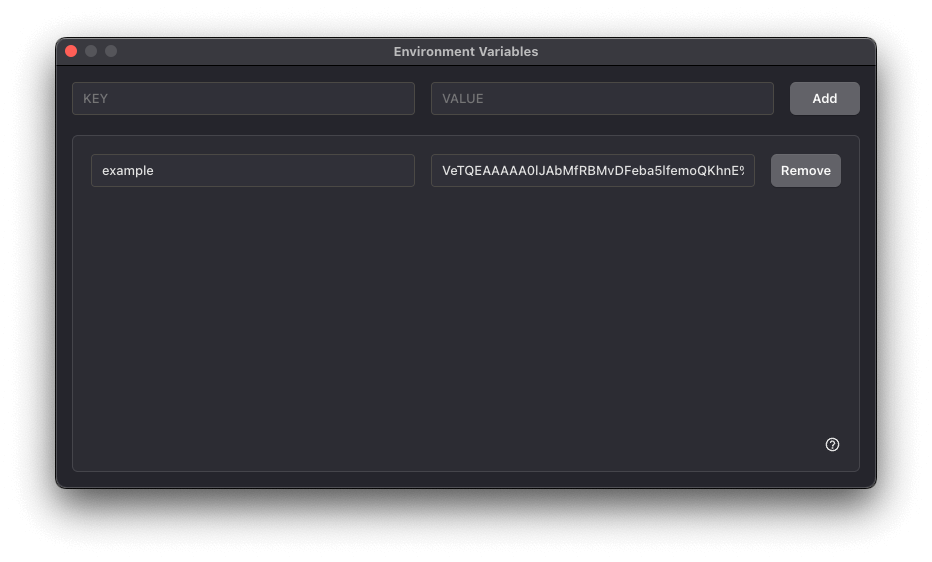
You can open the Environment Variables window from the Tools menu: Tools > Environment Variables.
Adding and editing
To add a variable, enter a key and value into the fields in the first row and click Add. Existing variables can be edited inline; click Save to persist your changes.
Keys are conventionally written in UPPER_SNAKE_CASE (e.g. OPENAI_API_KEY). All values are stored as strings, so parse them with Number(...) or compare against 'true' where you use them.

Variables persist across sessions and are shared by all tabs. Removing a variable takes effect immediately for any subsequent runs.
Using variables in code
Environment variables are exposed through the process.env object:
const apiKey = process.env.OPENAI_API_KEY

const response = await fetch('https://api.example.com/data', {
  headers: { Authorization: `Bearer ${apiKey}` },
})
Referencing a variable that hasn't been defined yet evaluates to undefined, so add a fallback or an early check in code you plan to share.