Logpoints
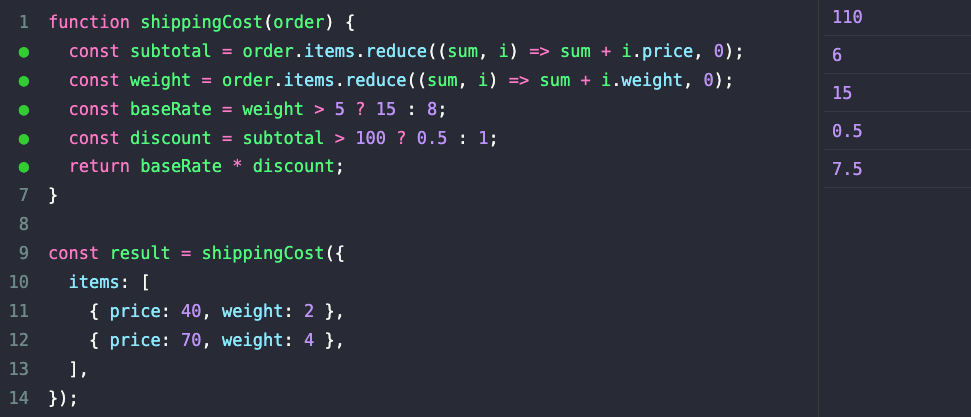
Logpoints let you inspect what your code is doing without changing it. Drop a marker on a line and RunJS prints the value of that line in the output pane. There's no console.log to add and nothing to clean up afterwards.
Unlike top-level expression results from Auto Log, logpoints work in places where output is normally invisible: inside function bodies, loop iterations, callback arguments, and const / let declarations.
Adding and removing
You can toggle a logpoint in two ways:
- Click the gutter next to a line to add a logpoint. Click the same spot again to remove it. A dot appears in the gutter when a logpoint is active.
- Press
F9with the caret on a line to toggle a logpoint.
To clear every logpoint in the current tab, press Cmd+Shift+F9 on macOS, or Ctrl+Shift+F9 on Windows and Linux.
Logpoints are tab-local. Closing the tab or restarting RunJS clears them.
Where logpoints are useful
Peeking inside loops and callbacks. Drop a logpoint on a line inside a .map, .filter, or for loop to see every value as it flows through. You'll get one output entry per iteration, in execution order.

Inspecting intermediate values. When a chain of method calls or a long expression isn't producing what you expected, a logpoint on any step shows what that step evaluated to.
Watching variable declarations. Logpoints work on const and let declarations inside functions, so you can see the assigned value without restructuring the code into something Auto Log can pick up.
Iterating without side effects. Logpoints live outside your source, so you can add and remove them freely while debugging without any risk of committing one to a file.